
For the people you serve
Content Guide
Improve your church articles with local AI.
Improve existing articles and get guidance as you write new ones. Discover what could be clearer, more helpful or more inviting, with feedback from six perspectives — right on your own computer.
Your articles stay on your device. Your decisions stay yours.
Local AI · No cloud article processing
An illustrative article · not a customer report
See the passage. Compare the change.
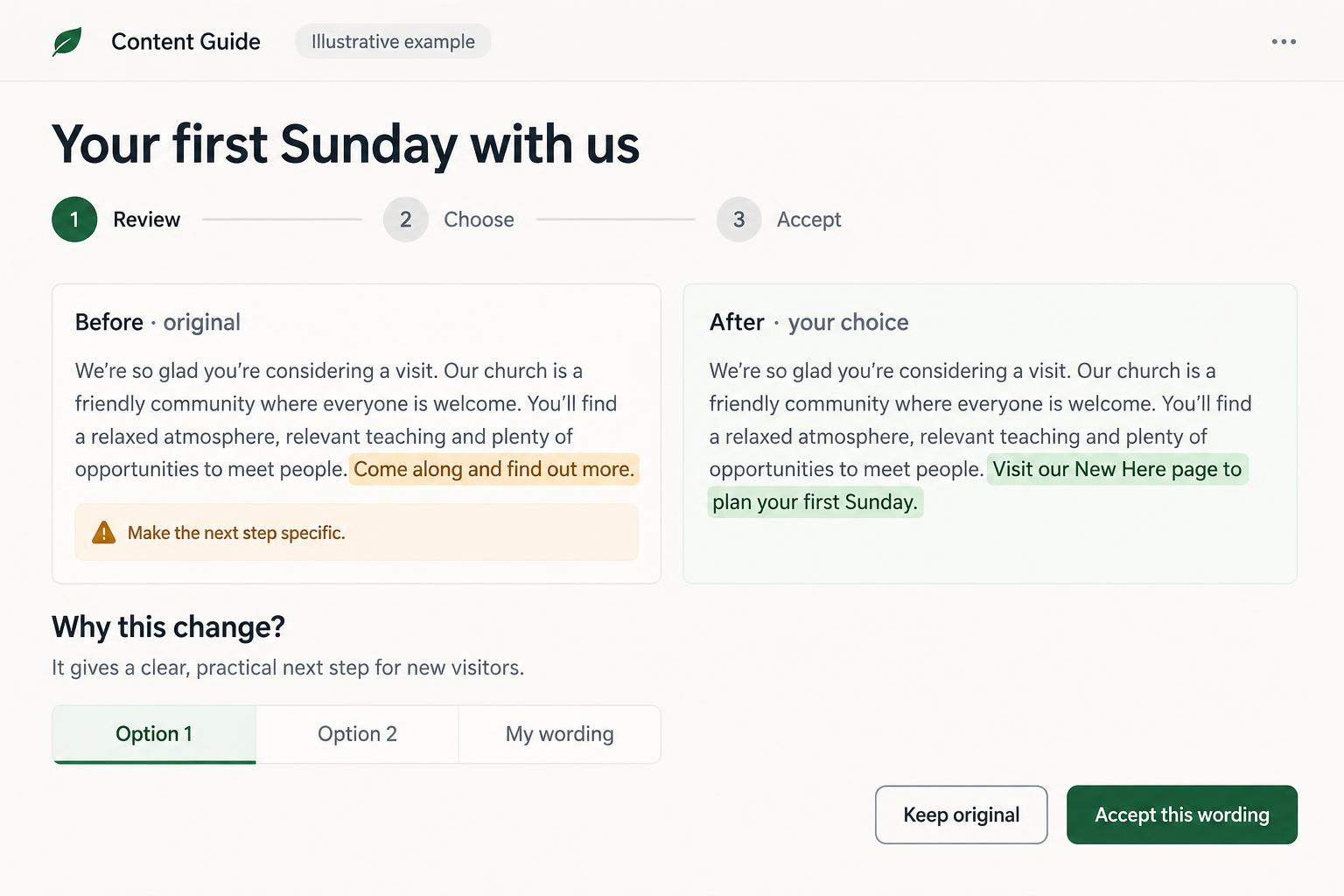
Your first Sunday with us
You are welcome to join us this Sunday.
Come along and find out more.
You do not need to know anyone or have everything figured out.
Review point: the invitation does not tell a first-time visitor what to do next.
How it works
1. Bring your article
You paste the article yourself. The review never fetches pages from your website.
2. Six perspectives review it locally
A local AI program on your computer checks the text from six angles — each in its own fresh session.
3. Understand the five most important improvements
Similar criticism from different perspectives is combined. Start with five priorities, each with a quoted passage, explanation and suggested improvement.
4. Choose and improve
Compare original and alternative wording in tabs, accept one or write your own. Recheck the edited article locally and learn from the explanations.
A thoughtful companion for your ministry
Care for the articles you have.
Make room for what is missing.
Start with the articles your church already has: clearer language, stronger headings and an easier next step for the reader. New articles come later, when you choose them. Writing help is an optional next step, not the starting point.
A focused starting point, not a replacement for your pastoral judgment. Time savings depend on your starting point and the review your article needs.
More than an AI answer
A clear next step. The choice stays yours.
You stay in control
Original and editable suggestion remain visible together. Accept, revise or leave a passage unchanged. Undo is available; a proposed change of meaning needs your approval.
Important passages first
Duplicate criticism is combined into one overview. Start with the five most important improvements, marked in color, and open the rest when you want. Priorities are judgments, not measured ranking gains.
Help in your own website editor
Choose WordPress, Wix, Squarespace, Webflow, ChurchDesk, ChurchTools or another CMS. Add your editor or version; the coach helps you use the features actually available to you.
Tools only when useful
Start with built-in options. Where relevant, explore optional tools or plugins with official links. Check current price, compatibility, privacy and maintenance before deciding — nothing is installed for you.
Learn as you improve
Every marked passage explains the problem and the reasoning behind its solution in plain language. Over time you recognize these patterns yourself and write stronger first drafts — the goal is your growth, not dependence on the tool.
Your articles stay on your device
The pasted article lives in this page's memory only — not saved in browser storage, not sent to us or to an online AI. Only the hints you select can be exported, without your article.
Free · no purchase · no account
Try Content Guide with one article
This is the real product, not a video: paste one of your articles, connect a local AI program such as Ollama running on this computer, and run the perspectives yourself. Everything runs on your computer. Content Guide does not transmit your article or your review results to us or to any online AI service, and there is no automatic switch to an online AI. You need a local model installed on this computer; without one the review cannot run.
Local editorial coach
Your article is reviewed by AI on your own computer — it is not sent to us or to any online AI service. Each perspective runs in its own fresh session. Only the hints you select can be saved, as a separate file without your article. Local review is not a legal, theological or safety verdict.
Free visit: review and improve one article. No automatic payment; yearly access is needed for regular use. This browser-only trial is not a tamper-proof licence lock.
1. Connect your local AI
Set up Ollama and a suitable model together
A guided setup checks memory and supported graphics information on your computer, suggests a local model and asks before installing it. It can download Ollama and the model together. The suggestion is a cautious starting point, not a guarantee of the best model.
The suggested model is included automatically; each optional model needs a separate confirmation. Downloads require internet and several GB of space. Articles are not uploaded. Local-only settings disable Ollama cloud features, permit this website only and keep its connection on this computer.
Intel Macs and unsupported systems: check official Ollama support. Your browser cannot install programs itself.
Requires a local model program such as Ollama on this computer, allowed to answer this website.
2. Paste your article
Not stored in browser storage and not transmitted. Closing or clearing this page discards it.
Write a new article · local dialogue
What is the article about, who is it for, and what should readers take away?
Your website editor
- Check your website editor name or ask the person who maintains your website.
Menu names and features depend on your version, plan and permissions. No editor access is requested.
The dialogue stays in page memory and uses only local AI. Nothing changes in your article until you explicitly use a draft.
3. Choose perspectives and start
- First-time visitor — Does someone without church background understand this text?
- Reader — Is the article understandable and well structured?
- Editor — Are there repetitions, gaps or unclear statements?
- SEO advisor — Do title, headings and search intent fit?
- Invitation coach — Is it clear what the reader can do next?
- Critical reader — Which statements could be misunderstood?
A coach that explains, not just a chat
General chatbots can review text too. The difference here is the built-in coaching workflow: six defined perspectives, marked passages, hints that name the problem, the reason and a concrete improvement, fresh context for every perspective and your explicit decisions.
Privacy-conscious editing
Personal or sensitive articles can be pasted into a separate local editing area, marked and improved without sending that text to online AI or storing it. The local editorial coach runs on your computer and uses no online AI. Content Guide does not offer website analysis or online AI guidance. The entire service is not offline, and local review is not a privacy or safety guarantee. You can export the hints you select as a file and delete your article and results with one button at any time.
The license · local AI included
Your article. Six perspectives. Your computer.
The six perspectives and the optional theological-clarity perspective are shown above — try them free with one article. With the license, the local editorial coach is yours for regular use: as many articles as you like, on your computer, with no per-article limits, because local review uses no online AI at all.
First-time visitor
Does someone without church background understand the text?
Reader
Is the article understandable and well structured?
Editor
Are there repetitions, gaps or unclear statements?
SEO advisor
Do title, headings and search intent fit — without ranking promises?
Invitation coach
Is it clear what the reader can do next?
Critical reader
Which statements could be misunderstood?
An optional theological-clarity perspective points out unclarities and possible contradictions — it never decides whether a statement is theologically correct. Local review is not a legal or safety verdict; you review every hint yourself.
Start free. Decide after you try it.
Free: try the local editorial coach above with one of your articles. No purchase, no account, no online AI. You need a local AI program such as Ollama on this computer. The free trial is not saved — closing the page discards it, and you can export your selected hints as a file.
Continue only if it helps · $144 for twelve months
Plus applicable tax. One-time payment, no subscription and no automatic renewal. Use the local editorial coach for as many articles as you like during the twelve-month period. Paste one article at a time and keep every decision yours. No website analysis, no online AI and no online request allowance. Access to the paid coach ends after twelve months. You can choose to purchase another year yourself; you are not charged automatically. Your installed Ollama program and models remain on your computer. No account or backoffice is needed.
Use the personal access link in our message to purchase twelve-month access. The local trial above works without a link.